-
String vs String Buffer vs String Builder

String
- String is a character sequence
- It is immutable
- It is an object backed by String Class
- It supports several methods that assures efficient string handling.
- Each time when an operation is performed on these strings, a new string object would be created and original one remain unchanged

- StringBuilder is a class that allows mutable strings
- It is not thread safe, which means it’s not synchronized
- It provides faster performance
- It supports several methods which involves append(),insert(),charAt() and more

- StringBuffer is a class that creates mutable strings
- It is thread safe, which means it’s synchronized
- It provides slower performance
- It supports several methods append(),insert(),charAt() and more
Reference
https://programmerbay.com/difference-between-string-stringbuilder-and-stringbuffer/amp/
-
String
What is a Java String? In Java, a string is an object that represents a sequence of characters or char values. The java.lang.String class is used to create a Java string object.
There are two ways to create a String object:
- By string literal : Java String literal is created by using double quotes.
For Example: String s=“Welcome”; - By new keyword : Java String is created by using a keyword “new”.
For example: String s=new String(“Welcome”);
It creates two objects (in String pool and in heap) and one reference variable where the variable ‘s’ will refer to the object in the heap.
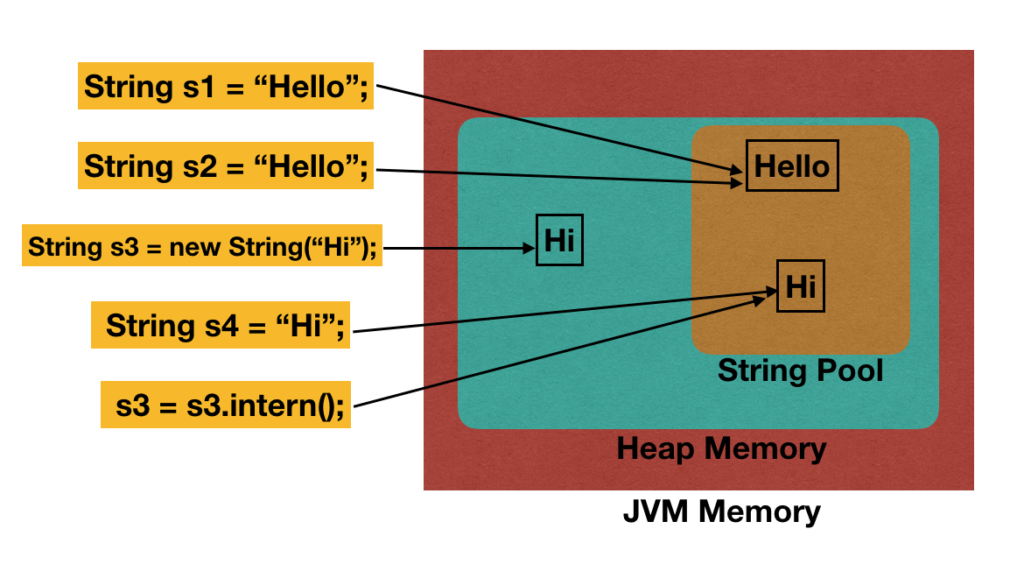
Java String Pool: Java String pool refers to collection of Strings which are stored in heap memory. In this, whenever a new object is created, String pool first checks whether the object is already present in the pool or not. If it is present, then same reference is returned to the variable else new object will be created in the String pool and the respective reference will be returned.
How Does Java String Pool Works?
- When we create a string literal, it’s stored in the string pool.
- If there is already a string with the same value in the string pool, then new string object is not created. The reference to the existing string object is returned.
- Java String Pool is a cache of string objects. It’s possible because string is immutable.
- If we create a string object using new operator, it’s created in the heap area. If we want to move it to the string pool, we can use
intern()method. - String Pool is a great example of Flyweight design pattern.
public class JavaStringPool {

    public static void main(String[] args) {
        String s1 = "Hello";
        String s2 = "Hello";
        String s3 = new String("Hi");
        String s4 = "Hi";

        System.out.println("s1 == s2? " + (s1 == s2));
        System.out.println("s3 == s4? " + (s3 == s4));

        s3 = s3.intern();
        System.out.println("s3 == s4? " + (s3 == s4));

    }

}
By new keyword
String s=new String(“Welcome”);
In such case, JVM will create a new string object in normal (non-pool) heap memory, and the literal “Welcome” will be placed in the string constant pool. The variable s will refer to the object in a heap (non-pool).

Moving on, Java String class implements three interfaces, namely – Serializable, Comparable and CharSequence.
 Since, Java String is immutable and final, so a new String is created whenever we do String manipulation. As String manipulations are resource consuming, Java provides two utility classes: StringBuffer and StringBuilder.
Let us understand the difference between these two utility classes:- StringBuffer and StringBuilder are mutable classes. StringBuffer operations are thread-safe and synchronized whereas StringBuilder operations are not thread-safe.
- StringBuffer is to be used when multiple threads are working on same String and StringBuilder in the single threaded environment.
- StringBuilder performance is faster when compared to StringBuffer because of no overhead of synchronized.

Reference
- By string literal : Java String literal is created by using double quotes.
-
Scanner & Wrapper Class
Scanner class in Java is found in the java.util package. Java provides various ways to read input from the keyboard, the java.util.Scanner class is one of them.
The Java Scanner class breaks the input into tokens using a delimiter which is whitespace by default. It provides many methods to read and parse various primitive values.
The Java Scanner class is widely used to parse text for strings and primitive types using a regular expression. It is the simplest way to get input in Java. By the help of Scanner in Java, we can get input from the user in primitive types such as int, long, double, byte, float, short, etc.
The Java Scanner class extends Object class and implements Iterator and Closeable interfaces.
The Java Scanner class provides nextXXX() methods to return the type of value such as nextInt(), nextByte(), nextShort(), next(), nextLine(), nextDouble(), nextFloat(), nextBoolean(), etc. To get a single character from the scanner, you can call next().charAt(0) method which returns a single character.
Modifer and Type Method Name Description int nextInt() Scans the next token of the input as an int. byte nextByte() Scans the next token of the input as a byte. short nextShort() Scans the next token of the input as a short. long nextLong() Scans the next token of the input as a long. float nextFloat() Scans the next token of the input as a float. double nextDoube() Scans the next token of the input as a double. boolean nextBoolean() Scans the next token of the input into a boolean value and returns that value. String next() Finds and returns the next complete token from this scanner. String nextLine() Advances this scanner past the current line and returns the input that was skipped. void close() Closes this scanner. pattern delimiter() Returns the PatternthisScanneris currently using to match delimitersnextInt(int radix)[TBD]
Why Char is not present in Scanner Class? [TBD]Java Scanner Class Declaration
- public final class Scanner
- extends Object
- implements Iterator<String>
How to get Java Scanner
To get the instance of Java Scanner which reads input from the user, we need to pass the input stream (System.in) in the constructor of Scanner class.
System Class
The
Systemclass contains several useful class fields and methods. It cannot be instantiated. [TBD]System class all Fields and Methods are Static.
System Package & Class
12345 java.lang//Class Systemjava.lang.Objectjava.lang.System;System.out.println();
Java System.out.println() is used to print an argument that is passed to it. The statement can be broken into 3 parts which can be understood separately as:
- System: It is a final class defined in the java.lang package.
- out: This is an instance of PrintStream type, which is a public and static member field of the System class.
- println(): As all instances of PrintStream class have a public method println(), hence we can invoke the same on out as well. This is an upgraded version of print(). It prints any argument passed to it and adds a new line to the output. We can assume that System.out represents the Standard Output Stream.

Wrapper classes in Java
The wrapper class in Java provides the mechanism to convert primitive into object and object into primitive.
Since J2SE 5.0, autoboxing and unboxing feature convert primitives into objects and objects into primitives automatically. The automatic conversion of primitive into an object is known as autoboxing and vice-versa unboxing.
Use of Wrapper classes in Java
Java is an object-oriented programming language, so we need to deal with objects many times like in Collections, Serialization, Synchronization, etc. Let us see the different scenarios, where we need to use the wrapper classes.
- Change the value in Method: Java supports only call by value. So, if we pass a primitive value, it will not change the original value. But, if we convert the primitive value in an object, it will change the original value.
- Serialization: We need to convert the objects into streams to perform the serialization. If we have a primitive value, we can convert it in objects through the wrapper classes.
- Synchronization: Java synchronization works with objects in Multithreading.
- java.util package: The java.util package provides the utility classes to deal with objects.
- Collection Framework: Java collection framework works with objects only. All classes of the collection framework (ArrayList, LinkedList, Vector, HashSet, LinkedHashSet, TreeSet, PriorityQueue, ArrayDeque, etc.) deal with objects only.
The eight classes of the java.lang package are known as wrapper classes in Java. The list of eight wrapper classes are given below:
Primitive Type Wrapper class boolean Boolean char Character byte Byte short Short int Integer long Long float Float double Double Autoboxing
The automatic conversion of primitive data type into its corresponding wrapper class is known as autoboxing, for example, byte to Byte, char to Character, int to Integer, long to Long, float to Float, boolean to Boolean, double to Double, and short to Short.
Since Java 5, we do not need to use the valueOf() method of wrapper classes to convert the primitive into objects.
Unboxing
The automatic conversion of wrapper type into its corresponding primitive type is known as unboxing. It is the reverse process of autoboxing. Since Java 5, we do not need to use the intValue() method of wrapper classes to convert the wrapper type into primitives.
-
Array
An array is a container or collection/group of similar data types. (99% in java)
An array allocates continuous/contiguous memory. The array has default values. In java, arrays are objects.
In Java, we declare the array with [].
eg: int[] arrayName = new int[6];
What is an array?
An array in java is a collection of values of similar data type, stored in the contiguous memory location, sharing a common name, and distinguished by an element’s index. The length of an array is established when the array is created.
Why should I learn Array?
Arrays are used to store multiple values in a single variable, instead of declaring separate variables for each value.
When we should use Array?
Arrays are used when there is a need to use many variables of a similar data type.
Some Important Points of an Array:
- Important Property of an Array is array length.
- The variables in the array are ordered, and each has an index beginning with 0.
- In Java, all arrays are dynamically allocated.
- A Java array variable can also be declared like other variables with [] after the data type.
- java array can also be used as a static field, a local variable, or a method parameter.
- The size of an array must be specified by int or short value and not long.
- The direct superclass of an array type is Object. [TBD]
- Every array type implements the interfaces Cloneable and java.io.Serializable. [TBD]
- This storage of arrays helps us in randomly accessing the elements of an array [Support Random Access].
- The size of the array cannot be altered(once initialized). However, an array reference can be made to point to another array.
- Dynamic allocation: In arrays, the memory is created dynamically, which reduces the amount of storage required for the code.
- Elements stored under a single name: All the elements are stored under one name. This name is used any time we use an array.
- Occupies contiguous location: The elements in the arrays are stored at adjacent positions. This makes it easy for the user to find the locations of its elements.
Advantages of Arrays in Java
- Java arrays enable you to access any element randomly with the help of indexes
- It is easy to store and manipulate large data sets
Disadvantages of Arrays in Java
- The size of the array cannot be increased or decreased once it is declared—arrays have a fixed size
- Java cannot store heterogeneous data. It can only store a single type of primitives
Reference
https://www.simplilearn.com/tutorials/java-tutorial/arrays-in-java
-
For vs While vs Do While
Here are few differences:
For loop While loop Initialization may be either in loop statement or outside the loop. Initialization is always outside the loop. Once the statement(s) is executed then after increment is done. Increment can be done before or after the execution of the statement(s). It is normally used when the number of iterations is known. It is normally used when the number of iterations is unknown. Condition is a relational expression. Condition may be expression or non-zero value. It is used when initialization and increment is simple. It is used for complex initialization. For is entry controlled loop. While is also entry controlled loop. for ( init ; condition ; iteration ) { statement(s); } while ( condition ) { statement(s); } used to obtain the result only when number of iterations is known. used to satisfy the condition when the number of iterations is unknown While vs do while
while do-while Condition is checked first then statement(s) is executed. Statement(s) is executed atleast once, thereafter condition is checked. It might occur statement(s) is executed zero times, If condition is false. At least once the statement(s) is executed. No semicolon at the end of while.
while(condition)Semicolon at the end of while.
while(condition);If there is a single statement, brackets are not required. Brackets are always required. Variable in condition is initialized before the execution of loop. variable may be initialized before or within the loop. while loop is entry controlled loop. do-while loop is exit controlled loop. while(condition)
{ statement(s); }do { statement(s); }
while(condition);For vs Do While
For loop Do-While loop Statement(s) is executed once the condition is checked. Condition is checked after the statement(s) is executed. It might be that statement(s) gets executed zero times. Statement(s) is executed at least once. For the single statement, bracket is not compulsory. Brackets are always compulsory. Initialization may be outside or in condition box. Initialization may be outside or within the loop. for loop is entry controlled loop. do-while is exit controlled loop. for ( init ; condition ; iteration )
{ statement (s); }do { statement(s); }
while (condition) ;}Reference
-
Loop
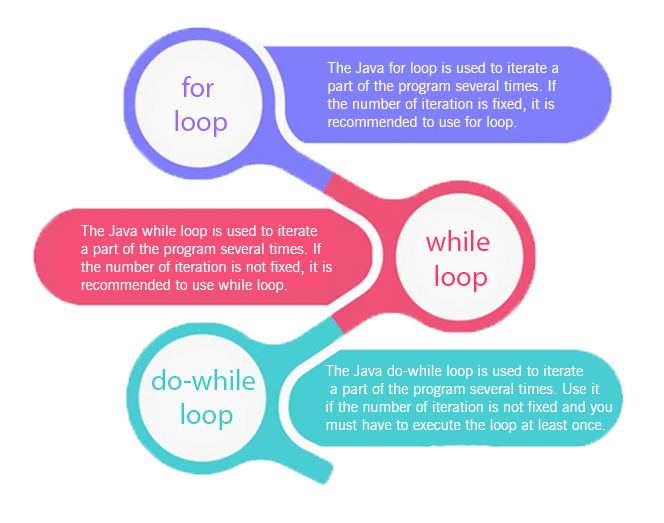
The Java for loop is used to iterate a part of the program several times.
There are three types of for loops in Java.
For loop
Loops in Java come into use when we need to repeatedly execute a block of statements. Java for loop provides a concise way of writing the loop structure. The for statement consumes the initialization, condition and increment/decrement in one line thereby providing a shorter, easy to debug structure of looping.

- while loop: A while loop is a control flow statement that allows code to be executed repeatedly based on a given Boolean condition. The while loop can be thought of as a repeating if statement.
Syntax :
while (boolean condition)
{
   loop statements...
}
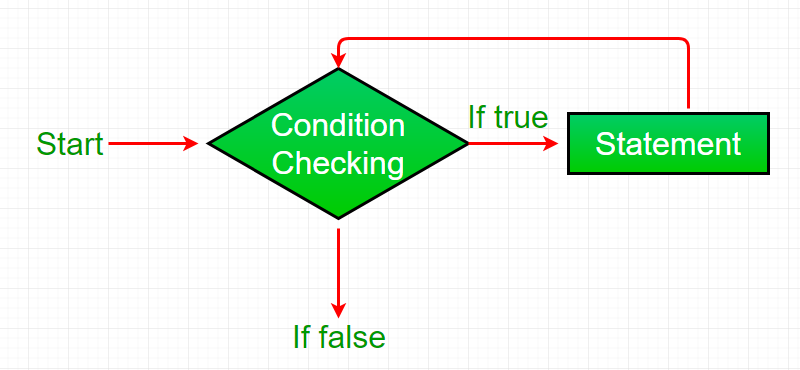
While loop starts with the checking of condition. If it evaluated to true, then the loop body statements are executed otherwise first statement following the loop is executed. For this reason it is also called Entry control loop
Once the condition is evaluated to true, the statements in the loop body are executed. Normally the statements contain an update value for the variable being processed for the next iteration.
When the condition becomes false, the loop terminates which marks the end of its life cycle.
for loop: for loop provides a concise way of writing the loop structure. Unlike a while loop, a for statement consumes the initialization, condition and increment/decrement in one line thereby providing a shorter, easy to debug structure of looping.
Syntax:
for (initialization condition; testing condition; increment/decrement) { statement(s) }- Flowchart:

- Initialization condition: Here, we initialize the variable in use. It marks the start of a for loop. An already declared variable can be used or a variable can be declared, local to loop only.
- Testing Condition: It is used for testing the exit condition for a loop. It must return a boolean value. It is also an Entry Control Loop as the condition is checked prior to the execution of the loop statements.
- Statement execution: Once the condition is evaluated to true, the statements in the loop body are executed.
- Increment/ Decrement: It is used for updating the variable for next iteration.
- Loop termination:When the condition becomes false, the loop terminates marking the end of its life cycle.
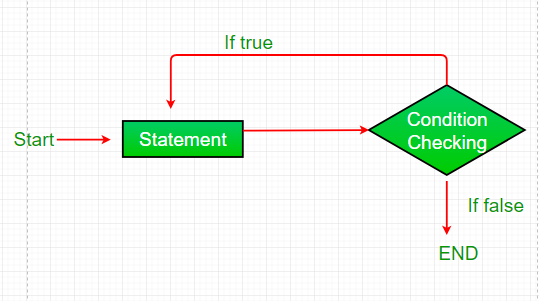
- do while: do while loop is similar to while loop with only difference that it checks for condition after executing the statements, and therefore is an example of Exit Control Loop.
Syntax:
do { statements.. } while (condition); -
Date Calculation
package com.myproject.date; import java.text.ParseException; import java.text.SimpleDateFormat; import java.util.Date; import java.util.Scanner; public class DateCalculation { public static void main(String[] args) throws ParseException { // TODO Auto-generated method stub int secs=60; int mins=60; int hrs=24; int yrs=365; Scanner sc=new Scanner(System.in); System.out.println("Enter your date of birth (dd/mm/yyyy)"); String birth=sc.next(); Date d=new Date(); SimpleDateFormat sd=new SimpleDateFormat("dd/MM/yyy"); String current=sd.format(d); Date d1=sd.parse(birth); Date d2=sd.parse(current); long time=d2.getTime()-d1.getTime(); long year=(time/(1000l*secs*mins*hrs*yrs)); long day=(time/(1000*secs*mins*hrs))%yrs; System.out.println(year +" years "+ day+" days"); } } -
Password Validation
package com.myproject.password; import java.util.Scanner; public class PasswordValidation { public static void main(String[] args) { // TODO Auto-generated method stub String old[]= {"abcA@123","abcA$123","sa123!B7"}; int lower=0; int upper=0; int number=0; int special=0; boolean check=false; Scanner sc=new Scanner(System.in); System.out.println("Enter the Password"); String pass=sc.nextLine(); for(int i=0;i<old.length;i++) { if(pass.equals(old[i])) { System.out.println("Already used this password please create new one"); check=true; break; } } if(!(pass.length()>=8 && pass.length()<=15)) { System.out.println("password must have 8 to 15 character"); check=true; } if(check==false) { for(int i=0;i<pass.length();i++) { if(pass.charAt(i)>='A' && pass.charAt(i)<='Z') { upper++; } else if(pass.charAt(i)>='a' && pass.charAt(i)<='z') { lower++; } else if(pass.charAt(i)>='0' && pass.charAt(i)<='9') { number++; } else if((pass.charAt(i)>=58 && pass.charAt(i)<=64) ||(pass.charAt(i)>=33 && pass.charAt(i)<=47)|| (pass.charAt(i)>=94 && pass.charAt(i)<=96) || (pass.charAt(i)>=123 && pass.charAt(i)<=126)) { special++; } } if(upper==0) { System.out.println("Atleast add one upper case"); } else if(lower==0) { System.out.println("Atleast add one lower case"); } else if(number==0) { System.out.println("Atleast add one number "); } else if(special==0) { System.out.println("Atleast add one special character"); } else { System.out.println("Password is Valid"); } } } } -
TNEB Bill Calculation
From Unit To Unit Rate (Rs.) Max Unit 1 100 0 100 1 100 0 200 101 200 1.5 200 1 100 0 500 101 200 2 500 201 500 3 500 1 100 0 9999999 101 200 3.5 9999999 201 500 4.6 9999999 501 Above 6.6 9999999 package com.myproject.eb; import java.util.Scanner; public class EbCalculation { public static void main(String[] args) { // TODO Auto-generated method stub Scanner sc=new Scanner(System.in); System.out.println("Enter the Units"); int unit=sc.nextInt(); double amount=0; if(unit<=100) { amount=unit*0; System.out.println("Pay Amount : "+amount); } else if(unit<=200) { amount=(100*0)+((unit-100)*1.5)+20; System.out.println("Pay Amount : "+amount); } else if(unit<=500) { amount=(100*0)+(100*2)+((unit-200)*3)+30; System.out.println("Pay Amount : "+amount); } else if(unit>500) { amount=(100*0)+(100*3.5)+(300*4.6)+((unit-500)*6.6)+50; System.out.println("Pay Amount : "+amount); } } } -
Credit Card Validation

package com.myproject.creditcard;

import java.util.Scanner;

public class CreditCardValidation {

	public static void main(String[] args) {
		// TODO Auto-generated method stub
		Scanner sc=new Scanner(System.in);
		System.out.println("Enter Credit Card No");
		String card=sc.next();
		int sum=0;
		int[] cardNo=new int[card.length()];
		for(int i=0;i<card.length();i++) {
			cardNo[i]=Character.getNumericValue(card.charAt(i));
		}
		for(int i=0;i<cardNo.length;i++) {

			if(i%2==0) {
				cardNo[i]=cardNo[i]*2;
			}
			if(cardNo[i]>9) {
				cardNo[i]=(cardNo[i]%10)+(cardNo[i]/10);
			}
			sum=sum+cardNo[i];
		}
		if(sum%10==0) {
			System.out.println("Card Number is valid");
		}
		else{
			System.out.println("Card Number is Not valid");
		}
	}

}

SATHIYASEELAN V